| Trial Version | Specifically Recognized Devices | Price | Buy now | Policies | Subscribe |
PCIScope DOS agent (PCITool)
| Overview | ||||||||||||||||||||||||||||||||||||||
|---|---|---|---|---|---|---|---|---|---|---|---|---|---|---|---|---|---|---|---|---|---|---|---|---|---|---|---|---|---|---|---|---|---|---|---|---|---|---|
| PCIScope DOS agent (further PCITool) is a command line utility for collecting PCI information under clear DOS, DOS included into Windows 95/98 or MSDOS prompt of Windows 95/98/ME. | ||||||||||||||||||||||||||||||||||||||
| Main features | ||||||||||||||||||||||||||||||||||||||
Main features of PCITool are:
| ||||||||||||||||||||||||||||||||||||||
| How to make a PCITool floppy | ||||||||||||||||||||||||||||||||||||||
It's convenient to use PCITool from a bootable floppy:
In order to make a PCITool floppy:
| ||||||||||||||||||||||||||||||||||||||
| Summary mode | ||||||||||||||||||||||||||||||||||||||
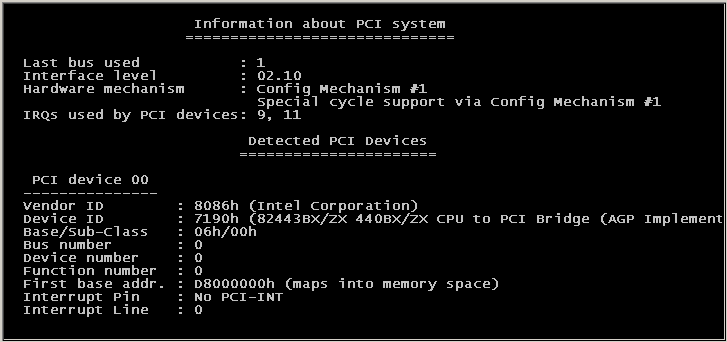
In this mode basic information for each installed PCI device is displayed:
PCITOOL uses PCIDEVS.INI and PCIVEND.INI to convert Vendor and Device IDs to human readable name. To get summary information you should launch PCITOOL without any parameters or using /A, /E, /XD, /CF to customize PCI device detection and output style. The following is a sample of program's screen:
| ||||||||||||||||||||||||||||||||||||||
| Brief mode | ||||||||||||||||||||||||||||||||||||||
In this mode only brief information for each installed PCI device is displayed:
To get brief information you should launch PCITOOL with /B option. | ||||||||||||||||||||||||||||||||||||||
| Complete dump | ||||||||||||||||||||||||||||||||||||||
| In this mode PCITOOL displays complete decoded dump of configuration space of PCI device specified in command line option. See description of /DC option for details. | ||||||||||||||||||||||||||||||||||||||
| Text dump | ||||||||||||||||||||||||||||||||||||||
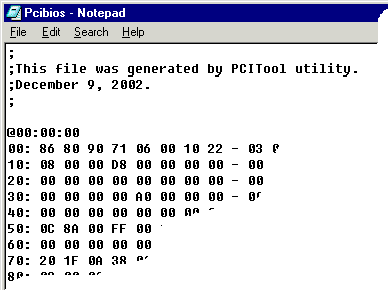
| In this mode PCITOOL produced text dump of configuration space and PCI option
ROM for all installed PCI devices and also memory and I/O mapped registers for
known types of PCI devices, such as USB 1.1/2.0, 1394 and CardBus controllers.
The dump can be printed to a console or saved to a file. Format of the file is
compatible with PCIScope application. You can simply import that file by PCIScope.
To get text dump use /DA option.
| ||||||||||||||||||||||||||||||||||||||
| Binary dump | ||||||||||||||||||||||||||||||||||||||
| In this mode PCITOOL produced binary (.BPD) file with dump of configuration
space and PCI option ROM for all installed PCI devices and also memory
and I/O mapped registers for known types of PCI devices, such as USB 1.1/2.0,
1394 and CardBus controllers. The binary dump also contains extended information:
size of BARs, PnP BIOS information, PnP System device list, ISA PnP information.
The binary file is compatible with PCIScope and could be simply imported.
To get text dump use /DB option. | ||||||||||||||||||||||||||||||||||||||
| Configuration INI file | ||||||||||||||||||||||||||||||||||||||
| To customize detection process a special configuration file is used. By default PCITOOL automatically searches for PCITOOL.INI file in the current directory. Use '/CF' option to override default name of configuration INI file. The file is used to change configuration of PCI device (e.g. to adjust BAR values, bridge filter settings, bus numbers and so on). | ||||||||||||||||||||||||||||||||||||||
| Format of a configuration file | ||||||||||||||||||||||||||||||||||||||
| Section named with PCI device location string contains settings to
temporary change PCI device configuration, e.g. BAR values, bus numbers, filter
settings etc. All parameters will be restored to original state at PCITOOL exit.
Format of the settings is the following: [BUS:DEV:FUN] - section name contains device location string - Values for non-bridge device
IRQ            = <IRQ line register value>   ; By default has decimal
                                             ; format
BAR{n}         = <Value of n-th BAR>         ; BAR0 ... BAR6.
                                             ; Use BAR6 to access
                                             ; Option ROM register.
- Values for bridge device
PrimaryBus     = <Primary bus number>
SecondaryBus   = <Secondary bus number>
SubordinateBus = <Subordinate bus number>
VGAEnable      = <Value of VGA enable bit>   ; VGA enable bit in Bridge
                                             ; Control register
ISAEnable      = <Value of ISA enable bit>   ; ISA enable bit in Bridge
                                             ; Control register
- Values for PCI-2-PCI bridge
MemFilter      = <Base>:<Limit> |            ; Not prefetchable memory
                 <Base>,<Size>               ; filter
PreFilter      = <Base>:<Limit> |            ; Prefetchable memory
                 <Base>,<Size>               ; filter
IoFilter       = <Base>:<Limit> |            ; I/O filter
                 <Base>,<Size> ;
- Values for CardBus bridge
ExCABase       = <ExCA base address>         ; CardBus/ExCA registers
                                             ; base address
MemFilter{n}   = <Base>:<Limit>[,Prefetch] | ; MemFilter0, MemFilter1
                 <Base>,<Size>[,Prefetch]    ; Memory filter
IoFilter{n}    = <Base>:<Limit>            | ; IoFilter0, IoFilter1
                 <Base>,<Size>               ; I/O filter
All numbers should have hexadecimal format, except: It needs to specify prefix '0x' or postfix 'h' to force the number to be recognized as hexadecimal. If the value string contains hexadecimal digits than the number is automatically recognized as hexadecimal. | ||||||||||||||||||||||||||||||||||||||
| Command mode | ||||||||||||||||||||||||||||||||||||||
| In this mode PCITOOL is only able to execute commands to read/write configuration space of any PCI devices. /CM, /W and /R options switch the program to command mode and force it to ignore all another options. PCITOOL supports both commands in a command line and in a batch command file. | ||||||||||||||||||||||||||||||||||||||
| Format of a command file | ||||||||||||||||||||||||||||||||||||||
Don't add leading slash before the commands.
;
;Some comments
;

W{b|w|d}:BUS:DEV:FUN:OFF=VAL ; Write data
...
R{b|w|d}:BUS:DEV:FUN:OFF     ; Read data
...
| ||||||||||||||||||||||||||||||||||||||
| Command line parameters | ||||||||||||||||||||||||||||||||||||||
| Syntax:
PCITOOL [/H|?] [/A] [/B] [/E] [/SF] [/DC:n] [/DA[:filename]] [/DB:filename] [/XD:BUS:DEV:FUN] [/XR] [/XP] [/HR] [/RS] [/CF:filename] [/CB] [/W{b|w|d}:BUS:DEV:FUN:OFF=VAL] [/R{b|w|d}:BUS:DEV:FUN:OFF] [/CM[:filename]] where:
| ||||||||||||||||||||||||||||||||||||||
| PCITool components | ||||||||||||||||||||||||||||||||||||||
The following PCITool files can be found in PCIScope installation directory:
|